
$399.00
On Hold
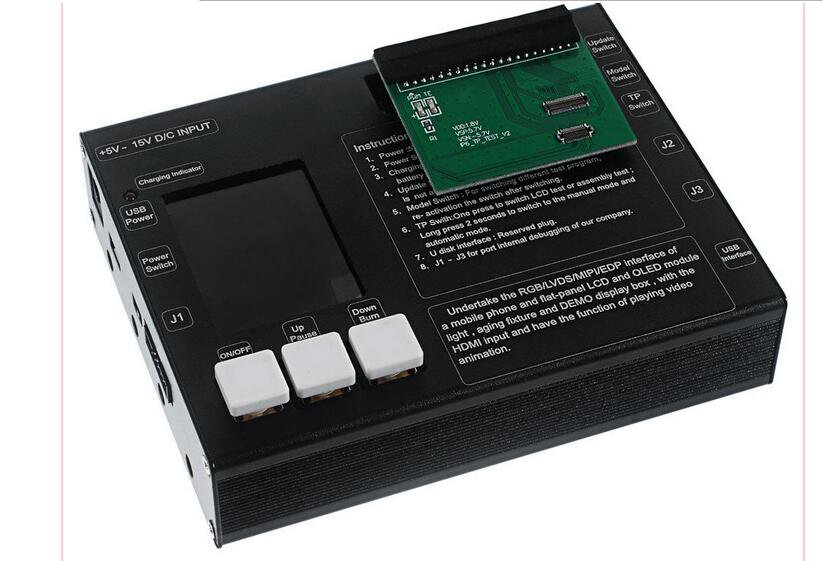
LCD Display Touch Screen Digitizer Tester Check PCB for iPhone 4 4s 5 5s 5c 6 6 plus
More than 10 available
Details
Shipping: US-Mainland: free (more destinations)
Condition: Brand new
*The store has not been updated recently. You may want to contact the merchant to confirm the availability of the product.


Used to test the condition of the touch screen digitizer or LCD display, whether it is good or bad, workable or unworkable
Power adapter and PCB boards are included for facilitating your testing
With LED power indicator
Portable and lightweight design, easy to carry and store
Easy to operate
Operation:
1. Turn on the Power Switch Button
2. Power source - USB power (not included) input or the attached power adapter (recommend using external power)
3. Turn on Switch Button
4. Insert the testing PCB board into the tester, then link the LCD or touch screen digitizer to the PCB board. Remember to link tightly for better testing
5. After it is well-linked and powered, if the LCD or digitizer is in good condition, clear picture will be displayed on the screen; if it is in bad condition, it will display abnormally
6. Press Last/Next Buttons to check the previous / next pictures
7. Press Model Change Button to choose the model you want
Note:
1. if the screen you are testing is not original, please change to OGS model, for example, you are testing a non-original iphone 6, you need change mode to I6_4.7_OGS
2. Every time you need another model screen, please change to the correct mode firstly, then insert the pcb board, then turn off and restart the machine, linking the screen.
8. Press LCD Display / Touch Screen Digitizer Interchange Button to choose the function you want
9. After finishing testing, press Switch Button and Power Switch Button again, then take out the PCB board and touch screen digitizer
Note: Software Update Button and J1 J2 J3 Buttons are used for internal debugging, which can not be pressed wrongly.
Compatible with:
iPhone 6 4.7-inch
iPhone 6 Plus 5.5 inch
iPhone 5s
iPhone 5
iPhone 5c
iPhone 4S
iPhone 4
Note: It can't work with iphone 6s and 6s plus.
Package included:
1 x Universal LCD Display / Touch Screen Digitizer Tester
2 x Testing PCB Boards for iPhone 6 4.7
2 x Testing PCB Boards for iPhone 6 Plus 5.5
2 x Testing PCB Boards for iPhone 5
2 x Testing PCB Boards for iPhone 5s
2 x Testing PCB Boards for iPhone 5c
2 x Testing PCB Boards for iPhone 4 4s
1 x Power Adapter (5V 2A)
Power adapter and PCB boards are included for facilitating your testing
With LED power indicator
Portable and lightweight design, easy to carry and store
Easy to operate
Operation:
1. Turn on the Power Switch Button
2. Power source - USB power (not included) input or the attached power adapter (recommend using external power)
3. Turn on Switch Button
4. Insert the testing PCB board into the tester, then link the LCD or touch screen digitizer to the PCB board. Remember to link tightly for better testing
5. After it is well-linked and powered, if the LCD or digitizer is in good condition, clear picture will be displayed on the screen; if it is in bad condition, it will display abnormally
6. Press Last/Next Buttons to check the previous / next pictures
7. Press Model Change Button to choose the model you want
Note:
1. if the screen you are testing is not original, please change to OGS model, for example, you are testing a non-original iphone 6, you need change mode to I6_4.7_OGS
2. Every time you need another model screen, please change to the correct mode firstly, then insert the pcb board, then turn off and restart the machine, linking the screen.
8. Press LCD Display / Touch Screen Digitizer Interchange Button to choose the function you want
9. After finishing testing, press Switch Button and Power Switch Button again, then take out the PCB board and touch screen digitizer
Note: Software Update Button and J1 J2 J3 Buttons are used for internal debugging, which can not be pressed wrongly.
Compatible with:
iPhone 6 4.7-inch
iPhone 6 Plus 5.5 inch
iPhone 5s
iPhone 5
iPhone 5c
iPhone 4S
iPhone 4
Note: It can't work with iphone 6s and 6s plus.
Package included:
1 x Universal LCD Display / Touch Screen Digitizer Tester
2 x Testing PCB Boards for iPhone 6 4.7
2 x Testing PCB Boards for iPhone 6 Plus 5.5
2 x Testing PCB Boards for iPhone 5
2 x Testing PCB Boards for iPhone 5s
2 x Testing PCB Boards for iPhone 5c
2 x Testing PCB Boards for iPhone 4 4s
1 x Power Adapter (5V 2A)


 HK, NT